Tuesday, 8 May 2018

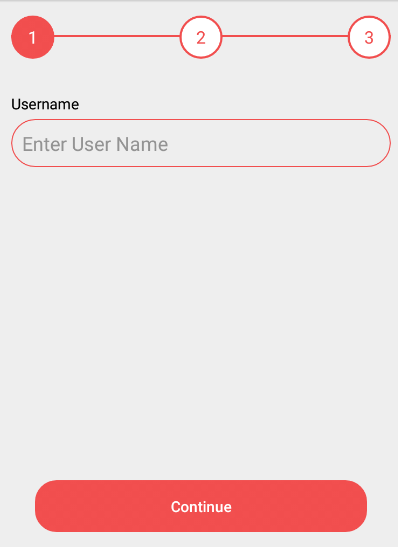
How to Implement the Step View in android studio.
Open android studio and create a new project.
File => New => New Project => Configure your new project => Select the form factor yours app will run on => Add an Activity to Mobile => Customize the Activity => Finish.

Create Xml file in project.    
Open => app => res => layout - activity_main.xml.

<?xml version="1.0" encoding="utf-8"?>
<RelativeLayout xmlns:android="http://schemas.android.com/apk/res/android"
    xmlns:tools="http://schemas.android.com/tools"
    android:id="@+id/activity_main"
    android:layout_width="match_parent"
    android:layout_height="match_parent"
    android:paddingBottom="@dimen/activity_vertical_margin"
    android:paddingLeft="@dimen/activity_horizontal_margin"
    android:paddingRight="@dimen/activity_horizontal_margin"
    android:paddingTop="@dimen/activity_vertical_margin"
    tools:context="com.bagicode.www.bagiregisterapp.MainActivity">

    <View
        android:layout_width="match_parent"
        android:layout_height="2dp"
        android:layout_alignParentLeft="true"
        android:layout_marginTop="18dp"
        android:background="#FFF14E4E" />

    <RelativeLayout
        android:id="@+id/layoutStatus"
        android:layout_width="match_parent"
        android:layout_height="wrap_content">

        <TextView
            android:id="@+id/txtOne"
            android:layout_width="40dp"
            android:layout_height="40dp"
            android:layout_alignParentLeft="true"
            android:background="@drawable/rectangle_aktif"
            android:gravity="center"
            android:padding="5dp"
            android:text="1"
            android:textColor="#FFF"
            android:textSize="16sp" />

        <TextView
            android:id="@+id/txtTwo"
            android:layout_width="40dp"
            android:layout_height="40dp"
            android:layout_centerHorizontal="true"
            android:background="@drawable/rectangle_non"
            android:gravity="center"
            android:padding="5dp"
            android:text="2"
            android:textColor="#FFF14E4E"
            android:textSize="16sp" />

        <TextView
            android:id="@+id/txtThree"
            android:layout_width="40dp"
            android:layout_height="40dp"
            android:layout_alignParentRight="true"
            android:background="@drawable/rectangle_non"
            android:gravity="center"
            android:padding="5dp"
            android:text="3"
            android:textColor="#FFF14E4E"
            android:textSize="16sp" />
    </RelativeLayout>

    <RelativeLayout
        android:layout_width="match_parent"
        android:layout_height="wrap_content"
        android:layout_below="@id/layoutStatus"
        android:layout_marginTop="16dp">

        <LinearLayout
            android:id="@+id/layOne"
            android:layout_width="match_parent"
            android:layout_height="wrap_content"
            android:orientation="vertical">

            <TextView
                android:layout_width="wrap_content"
                android:layout_height="wrap_content"
                android:layout_marginTop="16dp"
                android:text="Username"
                android:textColor="#000" />

            <EditText
                android:layout_width="match_parent"
                android:layout_height="wrap_content"
                android:layout_marginTop="5dp"
                android:background="@drawable/border"
                android:hint="Enter User Name"
                android:padding="10dp" />

        </LinearLayout>

        <LinearLayout
            android:id="@+id/layTwo"
            android:layout_width="match_parent"
            android:layout_height="wrap_content"
            android:orientation="vertical"
            android:visibility="gone">


            <TextView
                android:layout_width="wrap_content"
                android:layout_height="wrap_content"
                android:layout_marginTop="16dp"
                android:text="Password"
                android:textColor="#000" />

            <EditText
                android:layout_width="match_parent"
                android:layout_height="wrap_content"
                android:layout_marginTop="5dp"
                android:background="@drawable/border"
                android:hint="*****"
                android:inputType="textPassword"
                android:padding="10dp" />

        </LinearLayout>

        <LinearLayout
            android:id="@+id/layThree"
            android:layout_width="match_parent"
            android:layout_height="wrap_content"
            android:orientation="vertical"
            android:visibility="gone">

            <TextView
                android:layout_width="wrap_content"
                android:layout_height="wrap_content"
                android:layout_marginTop="16dp"
                android:text="Email"
                android:textColor="#000" />

            <EditText
                android:layout_width="match_parent"
                android:layout_height="wrap_content"
                android:layout_marginTop="5dp"
                android:background="@drawable/border"
                android:hint="arunchoudhary780@gmail.com"
                android:padding="10dp" />
        </LinearLayout>

    </RelativeLayout>

    <RelativeLayout
        android:layout_width="wrap_content"
        android:layout_height="wrap_content"
        android:layout_alignParentBottom="true"
        android:layout_marginLeft="22dp"
        android:layout_marginRight="22dp">

        <LinearLayout
            android:id="@+id/layClickOne"
            android:layout_width="match_parent"
            android:layout_height="wrap_content"
            android:visibility="visible">

            <Button
                android:id="@+id/btnOne"
                android:layout_width="match_parent"
                android:layout_height="wrap_content"
                android:background="@drawable/rectangle_button"
                android:text="Continue"
                android:textAllCaps="false"
                android:textColor="#FFF" />
        </LinearLayout>

        <LinearLayout
            android:id="@+id/layClickTwo"
            android:layout_width="match_parent"
            android:layout_height="wrap_content"
            android:visibility="gone">

            <Button
                android:id="@+id/btnBackOne"
                android:layout_width="match_parent"
                android:layout_height="wrap_content"
                android:layout_marginRight="6dp"
                android:layout_weight="1"
                android:background="@drawable/rectangle_button"
                android:text="Back"
                android:textAllCaps="false"
                android:textColor="#FFF" />

            <Button
                android:id="@+id/btnTwo"
                android:layout_width="match_parent"
                android:layout_height="wrap_content"
                android:layout_marginLeft="6dp"
                android:layout_weight="1"
                android:background="@drawable/rectangle_button"
                android:text="Continue"
                android:textAllCaps="false"
                android:textColor="#FFF" />
        </LinearLayout>

        <LinearLayout
            android:id="@+id/layClickThree"
            android:layout_width="match_parent"
            android:layout_height="wrap_content"
            android:orientation="horizontal"
            android:visibility="gone">

            <Button
                android:id="@+id/btnBackTwo"
                android:layout_width="match_parent"
                android:layout_height="wrap_content"
                android:layout_marginRight="6dp"
                android:layout_weight="1"
                android:background="@drawable/rectangle_button"
                android:text="Back"
                android:textAllCaps="false"
                android:textColor="#FFF" />

            <Button
                android:id="@+id/btnThree"
                android:layout_width="match_parent"
                android:layout_height="wrap_content"
                android:layout_marginLeft="6dp"
                android:layout_weight="1"
                android:background="@drawable/rectangle_button"
                android:text="Submit"
                android:textAllCaps="false"
                android:textColor="#FFF" />
        </LinearLayout>
    </RelativeLayout>
</RelativeLayout>


Create Drawable file in project.  
Open => app => res => drawable - border.xml.

<?xml version="1.0" encoding="utf-8"?>
<shape xmlns:android="http://schemas.android.com/apk/res/android"
    android:shape="rectangle">
    <stroke
        android:color="#FFF14E4E"
        android:width="1dp"/>
    <corners
        android:radius="62dp"/>
</shape>


Open => app => res => drawable - rectangle_select.xml.

<?xml version="1.0" encoding="utf-8"?>
<shape xmlns:android="http://schemas.android.com/apk/res/android"
    android:shape="oval">
    <gradient
        android:startColor="#FFF14E4E"
        android:endColor="#FFF14E4E"
        android:angle="270"/>
    <corners
        android:radius="2dp"/>
</shape>


Open => app => res => drawable - rectangle_unselect.xml.
<?xml version="1.0" encoding="utf-8"?>
<shape xmlns:android="http://schemas.android.com/apk/res/android"
    android:shape="oval">
    <gradient
        android:startColor="#FFF"
        android:endColor="#FFF"
        android:angle="270"/>
    <corners
        android:radius="20dp"/>
    <stroke
        android:color="#FFF14E4E"
        android:width="2dp"/>
</shape>


Open => app => res => drawable - rectangle_button.xml.

<?xml version="1.0" encoding="utf-8"?>
<shape xmlns:android="http://schemas.android.com/apk/res/android"
    android:shape="rectangle">
    <gradient
        android:startColor="#FFF14E4E"
        android:endColor="#FFF14E4E"
        android:angle="270"/>
    <corners
        android:radius="20dp"/>
</shape>


Create the Java file in project.
Open app => main => src = MainActivity.java

import android.graphics.Color;
import android.support.v7.app.AppCompatActivity;
import android.os.Bundle;
import android.view.View;
import android.widget.Button;
import android.widget.LinearLayout;
import android.widget.TextView;

public class MainActivity extends AppCompatActivity {
    TextView oneTextView, twoTextView, threeTextView;
    LinearLayout oneLinearLayout, twoLinearLayout, threeLinearLayout;
    LinearLayout oneClickLinearLayout, twoClickLinearLayout, threeClickLinearLayout;
    Button oneButton, twoButton, threeButton;
    Button oneBackButton, twoBackButton;

    @Override
    protected void onCreate(Bundle savedInstanceState) {
        super.onCreate(savedInstanceState);
        setContentView(R.layout.activity_main);

        //Getting the Widget Id Here
        init();
        //End
        //Using the click listener here
        listener();
        //End
    }

    private void listener() {
        oneButton.setOnClickListener(new View.OnClickListener() {
            @Override
            public void onClick(View v) {

                oneTextView.setBackground(getResources().getDrawable(R.drawable.rectangle_non));
                twoTextView.setBackground(getResources().getDrawable(R.drawable.rectangle_aktif));
                threeTextView.setBackground(getResources().getDrawable(R.drawable.rectangle_non));
                oneTextView.setTextColor(Color.parseColor("#FFF14E4E"));
                twoTextView.setTextColor(Color.parseColor("#ffffff"));

                oneLinearLayout.setVisibility(View.GONE);
                twoLinearLayout.setVisibility(View.VISIBLE);
                threeLinearLayout.setVisibility(View.GONE);


                oneClickLinearLayout.setVisibility(View.GONE);
                twoClickLinearLayout.setVisibility(View.VISIBLE);
                threeClickLinearLayout.setVisibility(View.GONE);
            }
        });

        twoButton.setOnClickListener(new View.OnClickListener() {
            @Override
            public void onClick(View v) {
                oneTextView.setBackground(getResources().getDrawable(R.drawable.rectangle_non));
                twoTextView.setBackground(getResources().getDrawable(R.drawable.rectangle_non));
                threeTextView.setBackground(getResources().getDrawable(R.drawable.rectangle_aktif));
                oneTextView.setTextColor(Color.parseColor("#FFF14E4E"));
                twoTextView.setTextColor(Color.parseColor("#FFF14E4E"));
                threeTextView.setTextColor(Color.parseColor("#ffffff"));

                oneLinearLayout.setVisibility(View.GONE);
                twoLinearLayout.setVisibility(View.GONE);
                threeLinearLayout.setVisibility(View.VISIBLE);

                oneClickLinearLayout.setVisibility(View.GONE);
                twoClickLinearLayout.setVisibility(View.GONE);
                threeClickLinearLayout.setVisibility(View.VISIBLE);
            }
        });


        twoBackButton.setOnClickListener(new View.OnClickListener() {
            @Override
            public void onClick(View v) {
                oneTextView.setBackground(getResources().getDrawable(R.drawable.rectangle_non));
                twoTextView.setBackground(getResources().getDrawable(R.drawable.rectangle_aktif));
                threeTextView.setBackground(getResources().getDrawable(R.drawable.rectangle_non));
                oneTextView.setTextColor(Color.parseColor("#FFF14E4E"));
                twoTextView.setTextColor(Color.parseColor("#ffffff"));
                threeTextView.setTextColor(Color.parseColor("#FFF14E4E"));

                oneLinearLayout.setVisibility(View.GONE);
                twoLinearLayout.setVisibility(View.VISIBLE);
                threeLinearLayout.setVisibility(View.GONE);


                oneClickLinearLayout.setVisibility(View.GONE);
                twoClickLinearLayout.setVisibility(View.VISIBLE);
                threeClickLinearLayout.setVisibility(View.GONE);
            }
        });
        oneBackButton.setOnClickListener(new View.OnClickListener() {
            @Override
            public void onClick(View v) {
                oneTextView.setBackground(getResources().getDrawable(R.drawable.rectangle_aktif));
                twoTextView.setBackground(getResources().getDrawable(R.drawable.rectangle_non));
                threeTextView.setBackground(getResources().getDrawable(R.drawable.rectangle_non));
                oneTextView.setTextColor(Color.parseColor("#ffffff"));
                twoTextView.setTextColor(Color.parseColor("#FFF14E4E"));
                threeTextView.setTextColor(Color.parseColor("#FFF14E4E"));

                oneLinearLayout.setVisibility(View.VISIBLE);
                twoLinearLayout.setVisibility(View.GONE);
                threeLinearLayout.setVisibility(View.GONE);


                oneClickLinearLayout.setVisibility(View.VISIBLE);
                twoClickLinearLayout.setVisibility(View.GONE);
                threeClickLinearLayout.setVisibility(View.GONE);
            }
        });
    }

    private void init() {
        //Here Declare the TextView ID
        oneTextView = (TextView) findViewById(R.id.txtOne);
        twoTextView = (TextView) findViewById(R.id.txtTwo);
        threeTextView = (TextView) findViewById(R.id.txtThree);
        //End
        //Here Declare the LinearLayout ID
        oneLinearLayout = (LinearLayout) findViewById(R.id.layOne);
        twoLinearLayout = (LinearLayout) findViewById(R.id.layTwo);
        threeLinearLayout = (LinearLayout) findViewById(R.id.layThree);

        oneClickLinearLayout = (LinearLayout) findViewById(R.id.layClickOne);
        twoClickLinearLayout = (LinearLayout) findViewById(R.id.layClickTwo);
        threeClickLinearLayout = (LinearLayout) findViewById(R.id.layClickThree);
        //End
        //Here Declare the Button ID
        oneButton = (Button) findViewById(R.id.btnOne);
        twoButton = (Button) findViewById(R.id.btnTwo);
        threeButton = (Button) findViewById(R.id.btnThree);

        oneBackButton = (Button) findViewById(R.id.btnBackOne);
        twoBackButton = (Button) findViewById(R.id.btnBackTwo);
        //End
    }
}


Monday, 5 March 2018

How to implement the Bottom Sheet in android studio.

Creating New Project.
Open android studio and create a new project.


File => New => New Project => Configure your new project => Select the form factor yours app will run on => Add an Activity to Mobile => Customize the Activity => Finish.

First we need to add Library to our project.
compile 'com.jakewharton:butterknife:5.1.1'

Create Xml file in project.
Open => app => res => layout - activity_bottomsheet.xml.


<LinearLayout xmlns:android="http://schemas.android.com/apk/res/android"
    xmlns:app="http://schemas.android.com/apk/res-auto"
    android:layout_width="match_parent"
    android:layout_height="match_parent"
    android:background="#fff"
    android:gravity="center">


    <LinearLayout
        android:layout_width="fill_parent"
        android:layout_height="40dp"
        android:clickable="true"
        android:gravity="center"
        app:layout_anchorGravity="bottom|right|end">

        <LinearLayout
            android:id="@+id/layBottom"
            android:layout_width="wrap_content"
            android:layout_height="40dp"
            android:layout_alignParentBottom="true"
            android:background="#ff1329"
            android:gravity="center"
            android:orientation="horizontal"
            android:paddingLeft="18dp"
            android:paddingRight="18dp">

            <ImageView
                android:layout_width="22dp"
                android:layout_height="22dp"
                android:src="@mipmap/ic_launcher" />

            <TextView
                android:layout_width="wrap_content"
                android:layout_height="wrap_content"
                android:layout_marginLeft="8dp"
                android:text="Add to Cart"
                android:textColor="#fff"
                android:textSize="16dp" />
        </LinearLayout>

    </LinearLayout>
</LinearLayout>


Create Xml file in project.
Open => app => res => layout - bottom_dialog.xml.


<?xml version="1.0" encoding="utf-8"?>
<LinearLayout xmlns:android="http://schemas.android.com/apk/res/android"
    android:layout_width="match_parent"
    android:layout_height="match_parent"
    android:background="#fff"
    android:orientation="vertical">

    <LinearLayout
        android:layout_width="match_parent"
        android:layout_height="wrap_content"
        android:orientation="vertical">


        <LinearLayout
            android:layout_width="match_parent"
            android:layout_height="wrap_content"
            android:layout_marginBottom="32dp"
            android:orientation="vertical"
            android:paddingBottom="4dp"
            android:paddingLeft="12dp"
            android:paddingRight="12dp"
            android:paddingTop="4dp">

            <TextView
                android:layout_width="wrap_content"
                android:layout_height="wrap_content"
                android:layout_marginLeft="12dp"
                android:gravity="center|start"
                android:text="Quantity"
                android:textColor="#1e1e1e"
                android:textSize="12dp" />

            <LinearLayout
                android:layout_width="wrap_content"
                android:layout_height="wrap_content"
                android:layout_gravity="center|start"
                android:layout_marginLeft="18dp"
                android:layout_marginTop="12dp"
                android:background="@drawable/quantity_bg"
                android:orientation="horizontal">

                <LinearLayout
                    android:layout_width="match_parent"
                    android:layout_height="wrap_content"
                    android:gravity="center">

                    <LinearLayout
                        android:layout_width="match_parent"
                        android:layout_height="wrap_content"
                        android:gravity="center|end">

                        <LinearLayout
                            android:layout_width="160dp"
                            android:layout_height="28dp"
                            android:gravity="end|bottom"
                            android:orientation="horizontal"

                            >

                            <LinearLayout
                                android:id="@+id/layDesc"
                                android:layout_width="match_parent"
                                android:layout_height="match_parent"
                                android:layout_weight="1"
                                android:gravity="center">

                                <TextView
                                    android:id="@+id/txtDec"
                                    android:layout_width="wrap_content"
                                    android:layout_height="wrap_content"
                                    android:text="-"
                                    android:textColor="#000"
                                    android:textSize="20sp" />
                            </LinearLayout>


                            <LinearLayout
                                android:layout_width="match_parent"
                                android:layout_height="match_parent"
                                android:layout_weight="1"
                                android:gravity="center">

                                <LinearLayout
                                    android:layout_width="match_parent"
                                    android:layout_height="28dp"
                                    android:background="@drawable/quantity_add"
                                    android:gravity="center">

                                    <TextView
                                        android:id="@+id/txtQuantity"
                                        android:layout_width="wrap_content"
                                        android:layout_height="wrap_content"
                                        android:text="0"
                                        android:textColor="#fff"
                                        android:textSize="14sp" />
                                </LinearLayout>
                            </LinearLayout>

                            <LinearLayout
                                android:id="@+id/layIncrease"
                                android:layout_width="match_parent"
                                android:layout_height="match_parent"
                                android:layout_weight="1"
                                android:gravity="center">

                                <TextView
                                    android:layout_width="wrap_content"
                                    android:layout_height="wrap_content"
                                    android:text="+"
                                    android:textColor="#000"
                                    android:textSize="20sp" />
                            </LinearLayout>

                        </LinearLayout>

                    </LinearLayout>

                </LinearLayout>

            </LinearLayout>
        </LinearLayout>
    </LinearLayout>

    <LinearLayout
        android:id="@+id/layBottom"
        android:layout_width="match_parent"
        android:layout_height="40dp"
        android:layout_alignParentBottom="true"
        android:background="#ff1329"
        android:gravity="center"
        android:orientation="horizontal">

        <ImageView
            android:layout_width="22dp"
            android:layout_height="22dp"
            android:src="@mipmap/ic_launcher" />

        <TextView
            android:layout_width="wrap_content"
            android:layout_height="wrap_content"
            android:layout_marginLeft="8dp"
            android:text="Add to Cart"
            android:textColor="#fff"
            android:textSize="16dp" />
    </LinearLayout>

</LinearLayout>


Create Xml file in project.
Open => app => res => drawable- quantity_add.xml.


<?xml version="1.0" encoding="UTF-8"?>
<shape xmlns:android="http://schemas.android.com/apk/res/android" android:id="@+id/listview_background_shape">
    <stroke android:width="2dp" android:color="#1e1e1e" />
    <padding android:left="2dp"
        android:top="2dp"
        android:right="2dp"
        android:bottom="2dp" />
    <corners android:radius="32dp" />
    <solid android:color="#1e1e1e" />
</shape>


Create Xml file in project.
Open => app => res => drawable- quantity_bg.xml.

<?xml version="1.0" encoding="UTF-8"?>
<shape xmlns:android="http://schemas.android.com/apk/res/android" android:id="@+id/listview_background_shape">
    <stroke android:width="1dp" android:color="#1e1e1e" />
    <padding android:left="1dp"
        android:top="1dp"
        android:right="1dp"
        android:bottom="1dp" />
    <corners android:radius="62dp" />
    <solid android:color="#ffffff" />
</shape>


Create Xml file in project.

Open => app => res => drawable- theme_color.xml.


<?xml version="1.0" encoding="utf-8"?>
<selector xmlns:android="http://schemas.android.com/apk/res/android">
    <item>
        <shape>
            <solid android:color="@color/theme_color"/>
        </shape>
    </item>
</selector>


Create Xml file in project.Open => app => res => color - theme_color.xml.

<?xml version="1.0" encoding="utf-8"?>
<selector xmlns:android="http://schemas.android.com/apk/res/android">
    <item android:color="#009688"/>
</selector>


Create Xml file in project.
Open => app => res => anim- pop_hide.xml.


<?xml version="1.0" encoding="utf-8"?>
<set xmlns:android="http://schemas.android.com/apk/res/android">
    <translate
        android:fromYDelta="0"
        android:toYDelta="100%p"
        android:duration="300"
        android:interpolator="@android:anim/accelerate_decelerate_interpolator"/>
</set>


Create Xml file in project.
Open => app => res => anim- pop_show.xml.


<?xml version="1.0" encoding="utf-8"?>
<set xmlns:android="http://schemas.android.com/apk/res/android">
    <translate
        android:fromYDelta="100%p"
        android:toYDelta="0"
        android:duration="300"
        android:interpolator="@android:anim/accelerate_decelerate_interpolator"/>
</set>

Create Xml file in project.
Open => app => res => value - styles.xml.


<style name="MaterialAddressSheet" parent="@android:style/Theme.Dialog">
        <item name="android:windowIsTranslucent">true</item>
        <item name="android:windowBackground">@android:color/transparent</item>
        <item name="android:windowContentOverlay">@null</item>
        <item name="android:windowNoTitle">true</item>
        <item name="android:backgroundDimEnabled">true</item>
        <item name="android:windowIsFloating">false</item>
        <item name="android:windowAnimationStyle">@style/MaterialAddressSheetAnimation</item>
    </style>
    <style name="MaterialAddressSheetAnimation">
        <item name="android:windowEnterAnimation">@anim/pop_show</item>
        <item name="android:windowExitAnimation">@anim/pop_hide</item>
    </style>


Create the Java file in project.
Open app => main => src = BottomSheetActivity.java


public class BottomSheetActivity extends AppCompatActivity implements View.OnClickListener {
    @InjectView(R.id.layBottom)
    LinearLayout bottomLinearLayout;

    @Override
    protected void onCreate(@Nullable Bundle savedInstanceState) {
        super.onCreate(savedInstanceState);
        setContentView(R.layout.activity_bottomsheet);
        ButterKnife.inject(BottomSheetActivity.this);
        //Using the set click listener
        listener();
        //End
    }

    private void listener() {
        bottomLinearLayout.setOnClickListener(this);
    }

    @Override
    public void onClick(View view) {
        switch (view.getId()) {
            case R.id.layBottom:
                bottomSheetForSize();
                break;
        }
    }
    public void bottomSheetForSize() {
        View view = BottomSheetActivity.this.getLayoutInflater().inflate(R.layout.bottom_dialog, null);
        final TextView qtyTextView = (TextView) view.findViewById(R.id.txtQuantity);
        final LinearLayout increaseLinearLayout = (LinearLayout) view.findViewById(R.id.layIncrease);
        final LinearLayout descLinearLayout = (LinearLayout) view.findViewById(R.id.layDesc);
        final LinearLayout layBottom = (LinearLayout) view.findViewById(R.id.layBottom);

        /***animation*/
        final Dialog mBottomSheetDialogshare = new Dialog(BottomSheetActivity.this, R.style.MaterialAddressSheet);
        mBottomSheetDialogshare.setContentView(view);
        mBottomSheetDialogshare.setCancelable(true);
        mBottomSheetDialogshare.getWindow().setLayout(LinearLayout.LayoutParams.MATCH_PARENT, LinearLayout.LayoutParams.WRAP_CONTENT);
        /***open from bottom*/

        mBottomSheetDialogshare.getWindow().setGravity(Gravity.BOTTOM);
        mBottomSheetDialogshare.show();

        layBottom.setOnClickListener(new View.OnClickListener() {
            @Override
            public void onClick(View view) {
                mBottomSheetDialogshare.dismiss();
            }
        });

        increaseLinearLayout.setOnClickListener(new View.OnClickListener() {
            @Override
            public void onClick(View view) {

                int anyValue = Integer.parseInt(qtyTextView.getText().toString());
                //int mSelectQty = Integer.parseInt(mQty);
                if (anyValue < 5) {
                    anyValue++;
                    qtyTextView.setText(anyValue + "");
                }
            }
        });

        descLinearLayout.setOnClickListener(new View.OnClickListener() {
            @Override
            public void onClick(View view) {
                int anyValueD = Integer.parseInt(qtyTextView.getText().toString());
                if (Integer.parseInt(qtyTextView.getText().toString()) == 1) {
                } else if (anyValueD > 0) {
                    anyValueD--;
                    qtyTextView.setText(anyValueD + "");
                    String mQty = qtyTextView.getText().toString();

                }
            }
        });
    }

}

May this code help you. Thanks!!!!!!


How to implement the section Expandable Grid Layout.

Creating New Project.
Open android studio and create a new project.


compile 'com.android.support:recyclerview-v7:23.0.1'
compile 'com.mcxiaoke.volley:library-aar:1.0.0'
compile 'com.squareup.picasso:picasso:2.5.2'
compile 'com.android.support:cardview-v7:23.0.1'
compile 'com.jakewharton:butterknife:5.1.1'
compile 'de.hdodenhof:circleimageview:2.2.0'


RESPONSE:::


{
    "status": true,
    "data": [
        {
            "cat_pid": "1",
            "cat_id": "4",
            "name": "T shirt",
            "products": [
                {
                    "id": "1",
                    "image": "uploads/prod_file/1-1519369722-1.jpg",
                    "product_name": "Distressed Crew-Neck T-shirt"
                },
                {
                    "id": "2",
                    "image": "uploads/prod_file/1-1519370258-1.jpg",
                    "product_name": "Typographic Print Slim Fit T-shirt"
                },
                {
                    "id": "3",
                    "image": "uploads/prod_file/admin-1519370808-1.jpg",
                    "product_name": "Striped Crew-Neck T-shirt"
                },
                {
                    "id": "6",
                    "image": "uploads/prod_file/1-1519372439-1.jpg",
                    "product_name": "Striped Polo T-shirt with Vented Hemline"
                }
            ]
        }
    ]
}

File => New => New Project => Configure your new project => Select the form factor yours app will run on => Add an Activity to Mobile => Customize the Activity => Finish.

First we need to add Library to our project.
Create Xml file in project.

Open => app => res => layout - activity_main.xml.

<RelativeLayout xmlns:android="http://schemas.android.com/apk/res/android"
    xmlns:tools="http://schemas.android.com/tools" android:layout_width="match_parent"
    android:layout_height="match_parent"
    android:paddingTop="@dimen/activity_vertical_margin"
    android:background="#f3f4f9"
    android:paddingBottom="@dimen/activity_vertical_margin" tools:context=".MainActivity">

    <android.support.v7.widget.RecyclerView
        android:layout_width="match_parent"
        android:layout_height="match_parent"
        android:background="#fff"
        android:id="@+id/recycler_view"/>
</RelativeLayout>


Create Xml file in project.
Open => app => res => layout - layout_item.xml.


<?xml version="1.0" encoding="utf-8"?>
<LinearLayout xmlns:android="http://schemas.android.com/apk/res/android"
    xmlns:app="http://schemas.android.com/apk/res-auto"
    android:layout_width="match_parent"
    android:layout_height="@dimen/item_height"
    android:layout_margin="@dimen/item_margin"
    android:orientation="vertical"
    android:gravity="center|start"
  >

    <RelativeLayout
        android:layout_width="match_parent"
        android:layout_height="wrap_content"
        android:gravity="center|start">

        <LinearLayout
            android:id="@+id/layImage"
            android:layout_width="match_parent"
            android:layout_height="wrap_content"
            android:gravity="center|start">

            <ImageView
                android:id="@+id/image"
                android:layout_width="match_parent"
                android:layout_height="wrap_content"
                android:scaleType="centerCrop"
                android:src="@mipmap/ic_launcher" />
        </LinearLayout>
        <LinearLayout
            android:layout_width="match_parent"
            android:layout_height="wrap_content"
            android:layout_below="@+id/layImage"
            android:padding="4dp"
            android:background="#f3f4f9">
            <TextView
                android:id="@+id/text_item"
                android:layout_width="match_parent"
                android:layout_height="match_parent"
                android:text="Add"
                android:gravity="center"
                android:textSize="14dp"
                android:singleLine="true" />
        </LinearLayout>
    </RelativeLayout>
</LinearLayout>


Create Xml file in project.

Open => app => res => drawable- selector_section_toggle.xml.


<?xml version="1.0" encoding="utf-8"?>
<selector xmlns:android="http://schemas.android.com/apk/res/android">
    <item android:drawable="@drawable/icon_minus" android:state_checked="true" />
    <item android:drawable="@drawable/icon_plus" />
</selector>


Create Xml file in project.

Open => app => res => layout - layout_section.xml.


<?xml version="1.0" encoding="utf-8"?>
<LinearLayout xmlns:android="http://schemas.android.com/apk/res/android"
    xmlns:app="http://schemas.android.com/apk/res-auto"
    android:layout_width="match_parent"
    android:layout_height="wrap_content"
    android:layout_marginBottom="1dp">

    <LinearLayout
        android:layout_width="match_parent"
        android:layout_height="wrap_content"
        android:background="#f3f4f9"
        android:orientation="horizontal">

        <TextView
            android:id="@+id/text_section"
            android:layout_width="match_parent"
            android:layout_height="wrap_content"
            android:layout_weight="0.12"
            android:background="#f3f4f9"
            android:paddingBottom="@dimen/section_padding"
            android:paddingStart="@dimen/section_text_padding_left"
            android:paddingTop="@dimen/section_padding"
            android:singleLine="true"
            android:textColor="#000000"
            android:textSize="16dp" />

        <LinearLayout
            android:layout_width="match_parent"
            android:layout_height="match_parent"
            android:layout_weight=".2"
            android:gravity="center|end">

            <ToggleButton
                android:id="@+id/toggle_button_section"
                android:layout_width="16dp"
                android:layout_height="16dp"
                android:layout_marginRight="12dp"
                android:background="@drawable/selector_section_toggle"
                android:contentDescription="@string/image_button_content_description"
                android:padding="@dimen/section_padding"
                android:textOff=""
                android:textOn="" />
        </LinearLayout>
    </LinearLayout>

</LinearLayout>


Create the Java file in project.
Open app => main => src = MainActivity.java


public class MainActivity extends AppCompatActivity implements ItemClickListener {

    RecyclerView mRecyclerView;
    SectionedExpandableLayoutHelper sectionedExpandableLayoutHelper;
    String mImage;
    int mId;
    String mName, mCateName;
    //random data


    @Override
    protected void onCreate(Bundle savedInstanceState) {
        super.onCreate(savedInstanceState);
        setContentView(R.layout.activity_main);

        //setting the recycler view
        mRecyclerView = (RecyclerView) findViewById(R.id.recycler_view);

        getData();

        sectionedExpandableLayoutHelper = new SectionedExpandableLayoutHelper(this, mRecyclerView, this, 3);

    }

    //Get the country data here...
    private void getData() {
        StringRequest stringRequest = new StringRequest(Request.Method.POST, "https://mukh.pixelsoftwares.com/seller_fifo/api/mall",
                new Response.Listener<String>() {
                    @Override
                    public void onResponse(String response) {
                        Log.i("Service List::", "Service List::>>" + response);
                        try {
                            JSONObject jsonObject = new JSONObject(response);
                            String mStatus = jsonObject.getString("status");
                            if (mStatus.equals("true")) {
                                JSONArray jsonArray = jsonObject.getJSONArray("data");
                                Log.i("jsonArray::", "jsonArray::" + jsonArray);
                                for (int i = 0; i < jsonArray.length(); i++) {
                                    JSONObject jsonobject = jsonArray.getJSONObject(i);
                                    mCateName = jsonobject.optString("name");
                                    String mCategoryId = jsonobject.optString("cat_id");
                                    ArrayList<Item> arrayList = new ArrayList<>();
                                    arrayList.clear();
                                    JSONArray imageJsonArray = jsonobject.getJSONArray("products");
                                    for (int j = 0; j < imageJsonArray.length(); j++) {
                                        JSONObject jsonobjectImage = imageJsonArray.getJSONObject(j);
                                        mImage = jsonobjectImage.optString("image");
                                        mId = jsonobjectImage.optInt("id");
                                        mName = jsonobjectImage.optString("product_name");
                                        Item item = new Item();
                                        item.setName(mName);
                                        item.setImage(mImage);
                                        item.setId(mId);
                                        arrayList.add(item);
                                    }
                                    sectionedExpandableLayoutHelper.addSection(mCateName, arrayList);
                                    sectionedExpandableLayoutHelper.notifyDataSetChanged();

                                }

                            } else {
                                Toast.makeText(MainActivity.this, "No Data Found", Toast.LENGTH_SHORT).show();
                            }
                        } catch (JSONException e) {
                            e.printStackTrace();
                        }
                    }

                },
                new Response.ErrorListener() {
                    @Override
                    public void onErrorResponse(VolleyError error) {

                    }
                }) {

            @Override
            public Map<String, String> getHeaders() throws AuthFailureError {
                HashMap<String, String> headers = new HashMap<String, String>();
                headers.put("token", "96a02d9459756c7fb552363c0b43ab8e");
                return headers;
            }

            @Override
            protected Map<String, String> getParams() throws AuthFailureError {
                Map<String, String> map = new HashMap<String, String>();
                map.put("mall", "1");
                map.put("cat_id", "x");
                map.put("tokenid", "218759");
                return map;
            }

        };
        RequestQueue requestQueue = Volley.newRequestQueue(MainActivity.this);
        requestQueue.add(stringRequest);
        stringRequest.setRetryPolicy(new DefaultRetryPolicy(500000,
                DefaultRetryPolicy.DEFAULT_MAX_RETRIES,
                DefaultRetryPolicy.DEFAULT_BACKOFF_MULT));
    }

    //**********END**

    @Override
    public boolean onCreateOptionsMenu(Menu menu) {
        // Inflate the menu; this adds items to the action bar if it is present.
        getMenuInflater().inflate(R.menu.menu_main, menu);
        return true;
    }

    @Override
    public boolean onOptionsItemSelected(MenuItem item) {
        // Handle action bar item clicks here. The action bar will
        // automatically handle clicks on the Home/Up button, so long
        // as you specify a parent activity in AndroidManifest.xml.
        int id = item.getItemId();

        //noinspection SimplifiableIfStatement
        if (id == R.id.action_settings) {
            return true;
        }

        return super.onOptionsItemSelected(item);
    }

    @Override
    public void itemClicked(Item item) {
        String mId = String.valueOf(item.getId());
    }

    @Override
    public void itemClicked(Section section) {
        //Toast.makeText(this, "Section: " + ection.getName() + " clicked", Toast.LENGTH_SHORT).show();

    }
}


Create the Java file in project.
Open app => main => src = ItemClickListener.java


public interface ItemClickListener {
    void itemClicked(Item item);
    void itemClicked(Section section);
}


Create the Java file in project.
Open app => main => src = Section.java


public class Section {

    private final String name;

    public boolean isExpanded;

    public Section(String name) {
        this.name = name;
        isExpanded = false;
    }

    public String getName() {
        return name;
    }
}


Create the Java file in project.
Open app => main => src = SectionedExpandableGridAdapter.java


public class SectionedExpandableGridAdapter extends RecyclerView.Adapter<SectionedExpandableGridAdapter.ViewHolder> {

    //data array
    private ArrayList<Object> mDataArrayList;

    //context
    private final Context mContext;

    //listeners
    private final ItemClickListener mItemClickListener;
    private final SectionStateChangeListener mSectionStateChangeListener;

    //view type
    private static final int VIEW_TYPE_SECTION = R.layout.layout_section;
    private static final int VIEW_TYPE_ITEM = R.layout.layout_item; //TODO : change this

    public SectionedExpandableGridAdapter(Context context, ArrayList<Object> dataArrayList,
                                          final GridLayoutManager gridLayoutManager, ItemClickListener itemClickListener,
                                          SectionStateChangeListener sectionStateChangeListener) {
        mContext = context;
        mItemClickListener = itemClickListener;
        mSectionStateChangeListener = sectionStateChangeListener;
        mDataArrayList = dataArrayList;

        gridLayoutManager.setSpanSizeLookup(new GridLayoutManager.SpanSizeLookup() {
            @Override
            public int getSpanSize(int position) {
                return isSection(position)?gridLayoutManager.getSpanCount():1;
            }
        });
    }

    private boolean isSection(int position) {
        return mDataArrayList.get(position) instanceof Section;
    }

    @Override
    public ViewHolder onCreateViewHolder(ViewGroup parent, int viewType) {
        return new ViewHolder(LayoutInflater.from(mContext).inflate(viewType, parent, false), viewType);
    }


    @Override
    public void onBindViewHolder(ViewHolder holder, int position) {
        switch (holder.viewType) {
            case VIEW_TYPE_ITEM :
                final Item item = (Item) mDataArrayList.get(position);
                holder.itemTextView.setText(item.getName());
                String mImage=item.getImage();
                String mBaseImage = "http://mukh.pixelsoftwares.com/seller_fifo/" + mImage;
                Log.i("mBaseImage::-", "mBaseImage::-" + mBaseImage);
                Picasso.with(mContext).load(mBaseImage).resize(150, 150).into(holder.imageView);
                holder.view.setOnClickListener(new View.OnClickListener() {
                    @Override
                    public void onClick(View v) {
                        mItemClickListener.itemClicked(item);
                    }
                });
                break;
            case VIEW_TYPE_SECTION :
                final Section section = (Section) mDataArrayList.get(position);
                holder.sectionTextView.setText(section.getName());
                holder.sectionTextView.setOnClickListener(new View.OnClickListener() {
                    @Override
                    public void onClick(View v) {
                        mItemClickListener.itemClicked(section);
                    }
                });
                holder.sectionToggleButton.setChecked(section.isExpanded);
                holder.sectionToggleButton.setOnCheckedChangeListener(new CompoundButton.OnCheckedChangeListener() {
                    @Override
                    public void onCheckedChanged(CompoundButton buttonView, boolean isChecked) {
                        mSectionStateChangeListener.onSectionStateChanged(section, isChecked);
                    }
                });
                break;
        }
    }

    @Override
    public int getItemCount() {
        return mDataArrayList.size();
    }

    @Override
    public int getItemViewType(int position) {
        if (isSection(position))
            return VIEW_TYPE_SECTION;
        else return VIEW_TYPE_ITEM;
    }

    protected static class ViewHolder extends RecyclerView.ViewHolder {

        //common
        View view;
        int viewType;

        //for section
        TextView sectionTextView;
        ToggleButton sectionToggleButton;

        //for item
        TextView itemTextView;
        ImageView imageView;

        public ViewHolder(View view, int viewType) {
            super(view);
            this.viewType = viewType;
            this.view = view;
            if (viewType == VIEW_TYPE_ITEM) {
                imageView = (ImageView) view.findViewById(R.id.image);
                itemTextView = (TextView) view.findViewById(R.id.text_item);
            } else {
                sectionTextView = (TextView) view.findViewById(R.id.text_section);
                sectionToggleButton = (ToggleButton) view.findViewById(R.id.toggle_button_section);
            }
        }
    }
}


Create the Java file in project.
Open app => main => src = SectionedExpandableLayoutHelper.java


public class SectionedExpandableLayoutHelper implements SectionStateChangeListener {

    //data list
    private LinkedHashMap<Section, ArrayList<Item>> mSectionDataMap = new LinkedHashMap<Section, ArrayList<Item>>();
    private ArrayList<Object> mDataArrayList = new ArrayList<Object>();

    //section map
    //TODO : look for a way to avoid this
    private HashMap<String, Section> mSectionMap = new HashMap<String, Section>();

    //adapter
    private SectionedExpandableGridAdapter mSectionedExpandableGridAdapter;

    //recycler view
    RecyclerView mRecyclerView;

    public SectionedExpandableLayoutHelper(Context context, RecyclerView recyclerView, ItemClickListener itemClickListener,
                                           int gridSpanCount) {

        //setting the recycler view
        GridLayoutManager gridLayoutManager = new GridLayoutManager(context, gridSpanCount);
        recyclerView.setLayoutManager(gridLayoutManager);
        mSectionedExpandableGridAdapter = new SectionedExpandableGridAdapter(context, mDataArrayList,
                gridLayoutManager, itemClickListener, this);
        recyclerView.setAdapter(mSectionedExpandableGridAdapter);

        mRecyclerView = recyclerView;
    }

    public void notifyDataSetChanged() {
        //TODO : handle this condition such that these functions won't be called if the recycler view is on scroll
        generateDataList();
        mSectionedExpandableGridAdapter.notifyDataSetChanged();
    }

    public void addSection(String section, ArrayList<Item> items) {
        Section newSection;
        mSectionMap.put(section, (newSection = new Section(section)));
        mSectionDataMap.put(newSection, items);
    }

    public void addItem(String section, Item item) {
        mSectionDataMap.get(mSectionMap.get(section)).add(item);
    }

    public void removeItem(String section, Item item) {
        mSectionDataMap.get(mSectionMap.get(section)).remove(item);
    }

    public void removeSection(String section) {
        mSectionDataMap.remove(mSectionMap.get(section));
        mSectionMap.remove(section);
    }

    private void generateDataList () {
        mDataArrayList.clear();
        for (Map.Entry<Section, ArrayList<Item>> entry : mSectionDataMap.entrySet()) {
            Section key;
            mDataArrayList.add((key = entry.getKey()));
            if (key.isExpanded)
                mDataArrayList.addAll(entry.getValue());
        }
    }

    @Override
    public void onSectionStateChanged(Section section, boolean isOpen) {
        if (!mRecyclerView.isComputingLayout()) {
            section.isExpanded = isOpen;
            notifyDataSetChanged();
        }
    }
}


Create the Java file in project.
Open app => main => src = SectionStateChangeListener.java

public interface SectionStateChangeListener {
    void onSectionStateChanged(Section section, boolean isOpen);
}


Create the Java file in project.
Open app => main => src = Item.java

public class Item {

    public void setName(String name) {
        this.name = name;
    }

    String name;


    public String getImage() {
        return image;
    }

    public void setImage(String image) {
        this.image = image;
    }

    String image;

    public void setId(int id) {
        this.id = id;
    }

    int id;

    public Item() {
    }

    public Item(String name, int id) {
        this.name = name;
        this.id = id;
    }

    public int getId() {
        return id;
    }

    public String getName() {
        return name;
    }
}


May this code help you. Thanks!!!!!!


Screen Shot:-